The 50 Founders Club is open. Lifetime Access for €49.
Join now DayFlow.
Plan with your AI.
Travel with DayFlow.
Start with a free weekend preview: one trip, up to 3 days, and one destination. Multi-city and honeymoon plans unlock with a Trip Pass or Founders Lifetime.
Preview the product
See It In Action
No stock photos. No vague promises. Real screenshots of the app you'll actually use.
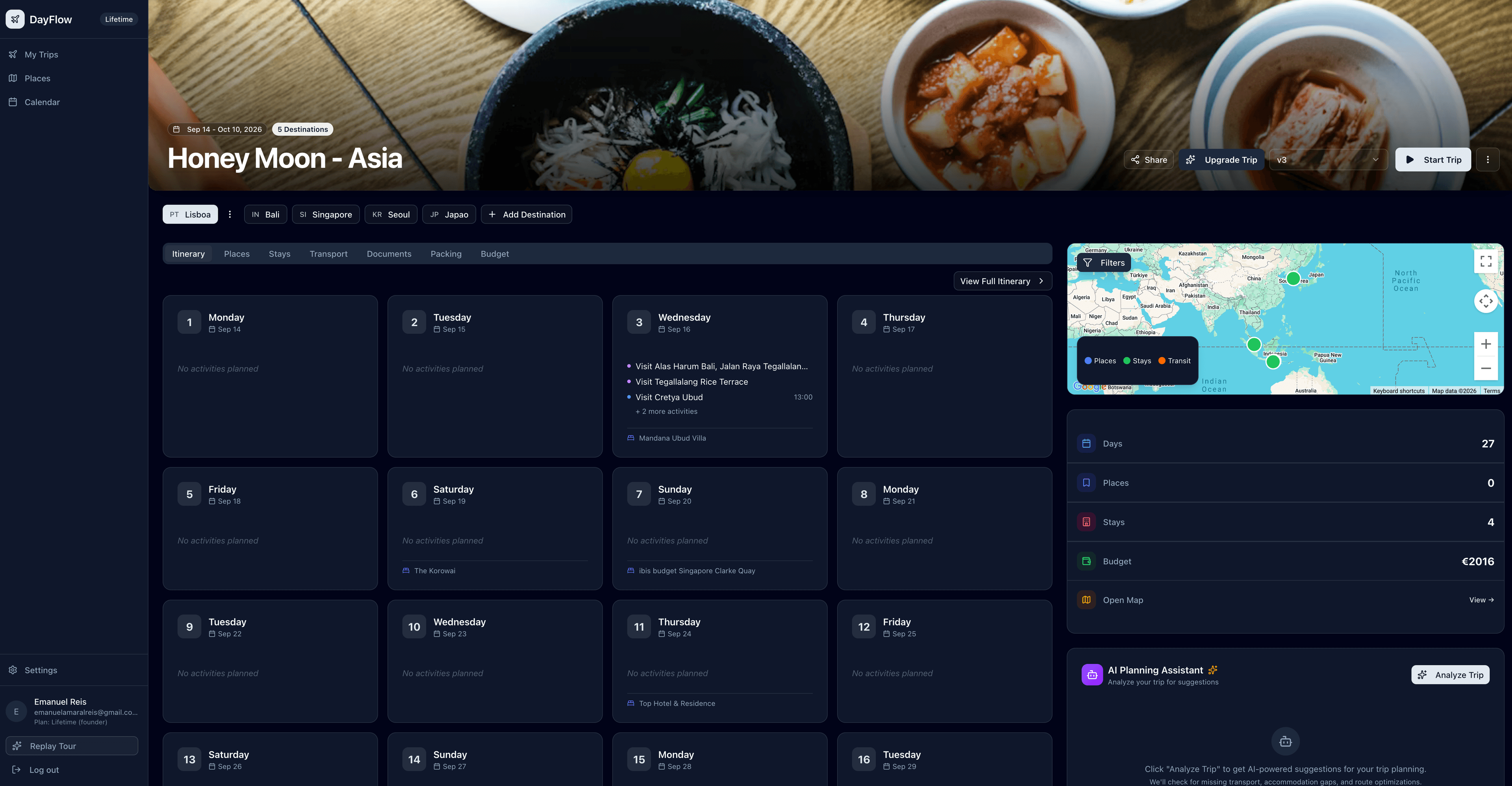
Everything about your trip, organized
Destinations, stays, transport, places, packing lists and budget — all structured in one page. No more switching between apps.
Connect your AI via MCP
Plan with your AI, travel with DayFlow. Use your own AI subscription with zero per-prompt markup.
1. Connect once with OAuth
Add this remote MCP URL in Claude, ChatGPT, Codex, Cursor, or another compatible OAuth MCP client:
https://dayflow.cogniza.co/api/mcpApprove permissions on the DayFlow consent screen; review or revoke them anytime in Settings → AI & MCP Connections.
2. Brainstorm in your favorite LLM
Turn flight emails, blog posts, or a 10-day Japan prompt into structured segments, places, stays, and daily schedules—without copying every place out of chat.
3. Execute on the ground
See real Google Maps transit lines, drag-and-drop your timeline, share a read-only link, or invite your partner to a shared account. Use Trip Mode offline. Prepare your trip while online; live map tiles need a connection.
OAuth 2.1 consent with scoped permissions: Read trips, Create & add, and Edit existing plans. No deletion allowed via MCP. Revoke a connection in Settings after confirming your choice.
Spreadsheets were made for offices,
not adventures.
You've got a Google Sheet for the itinerary, a Notion page for research, booking confirmations scattered across your inbox, and 47 saved pins on Google Maps.
It all works fine at home on your laptop. Then you land in a foreign city, your hands are full of luggage, and you're squinting at a spreadsheet cell trying to find your hotel address — with no Wi-Fi.
ChatGPT or Claude writes a great itinerary in chat—then you spend two hours copy-pasting every place into a spreadsheet or map.
Let your AI write directly into DayFlow via MCP. Trip Mode, live transport routes, and one offline-ready timeline with every address, booking, and note — accessible offline, designed for your phone, and shareable with your travel partner.
Google Sheets
Itinerary v3_final_FINAL
Notion
Restaurant research
Gmail
5 booking confirmations
Google Maps
47 saved places
"Send me that link!"
TripAdvisor
Bookmarked reviews
DayFlow
All in one place
How DayFlow works
From messy tabs to offline confidence in three steps.
Connect your AI or add places directly
Link Claude, ChatGPT, Codex, or Cursor via OAuth MCP to generate your trip structure and import places automatically—or search Google Maps directly in the workspace.
Shape the daily flow
Open the app to see your daily plan. Shape your day-by-day timeline with real walking, driving, and transit durations.
Switch to Trip Mode
Stop looking at a screen when you should be looking at the view. Your logistics are handled.
Everything you need.
Nothing you don't.
Six features that solve 90% of the planning headache.
Offline-ready timeline
Because the exact moment you need your hotel address is always when you haven't bought a local SIM card yet.
Shared account
Invite your travel partner. When they add a restaurant, it's on your map too. One trip, one plan, zero "did you see my message?"
Google Maps place search
Search Google Maps directly in your workspace to save places and their details, or add them manually.
Auto-generated map routes
Stop manually typing addresses into navigation apps. DayFlow automatically generates independent Google Maps route links from point A to point B for every step in your daily timeline.
Bring your own AI (MCP)
Connect Claude, ChatGPT, Codex, or Cursor to your DayFlow account via OAuth. Let your AI build and revise plans while you keep granular read/write/edit control.
Integrated budget tracking
Stop juggling a messy sheet for expenses and another app for your daily route. Log costs offline right alongside your itinerary.
No subscriptions.
Just Trip Passes.
You don't travel every month, so why pay every month? Buy a Pass when you need it, skip it when you don't.
Trip Passes
Free preview (€0): 1 active trip, up to 3 days, 1 destination, 5 Google Places lookups, and MCP connection included. No card required.
Every tier includes full MCP read/write/edit sync, offline Trip Mode & PDF export (browser print preview).
Unlimited trip days & segments, 50 Google Places lookups.
Everything in Short Break, plus:
- 150 Google Places lookups
Everything in Explorer, plus:
- 1,000 Google Places lookups
- Priority support
Make them jealous.
Stop taking screenshots of your spreadsheet. Generate a beautiful, read-only URL to share your entire itinerary seamlessly with friends and family.
The 50 Founders Club
Skip the per-trip fees forever. Get the Grand Voyage Pass with unlimited features, unlimited trips — locked in for life.
- Unlimited trips, unlimited sharing
- Full MCP read/write/edit sync with your own AI
- Exclusive 'Founding Member' badge
"Hi, I'm Manu. I'm a solo developer from the Azores. I started building DayFlow while planning my own honeymoon, because I refused to spend it digging through spreadsheets and browser tabs.
I'm one guy in the middle of the Atlantic making sure your logistics are solid. If you have a problem, you're talking to the person who wrote the code."

Ready to put your phone away?
Create a free account and start a weekend preview today. No credit card. When the trip grows past three days or one destination, add a Trip Pass or Founders Lifetime.
Already have an account? Log in.